



Unlock Server  
Your online unlock store
GSM-Forum  

Welcome to the GSM-Forum forums.

You are currently viewing our boards as a guest which gives you limited access to view most discussions and access our other features. By joining our free community you will have access to post topics, communicate privately with other members (PM), respond to polls, upload content and access many other special features. Registration is fast, simple and absolutely free so please, join our community today!

If you have any problems with the registration process or your account login, please contact contact us.

Go Back   GSM-Forum > Product Support Sections > Hard/Software Products (official support) > VygisToolbox

Reply
 
LinkBack Thread Tools Display Modes
Old 05-11-2012, 08:37   #1 (permalink)
Freak Poster
 
akadhitz's Avatar
 
Join Date: Apr 2009
Location: Siringan
Posts: 434
Member: 1017750
Status: Offline
Sonork: 100.1624716
Thanks: 240
Thanked 40 Times in 32 Posts
Lightbulb Vygis Problem on Windows7 ? [ANSWERED]
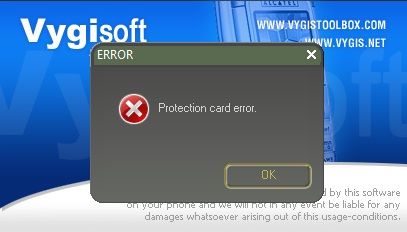
My vygis works on Windows XP but it did not work on Windows 7.

what is missing and what should i do?


please help
  Reply With Quote
Old 05-11-2012, 08:42   #2 (permalink)
Freak Poster
 
akadhitz's Avatar
 
Join Date: Apr 2009
Location: Siringan
Posts: 434
Member: 1017750
Status: Offline
Sonork: 100.1624716
Thanks: 240
Thanked 40 Times in 32 Posts
I also followed this instuction.

Quote:
1.Disconnect box from USB,if it was connected before.

2.Preinstall Smart Card dongle drivers - they can be found in "CARD DRIVERS" folder.
Best way to preinstall drivers is to use setup.exe, .msi or DPInst.exe installers.
For 32 bit OS use "DPInst_32.exe" and for 64 bit OS use "DPInst_64.exe".
Four different cards can be used for protection - so if you don't know
which exactly card is used for dongle-you can preinstall all possible drivers
depending from your Windows OS version.

2.Preinstall box drivers - they can be found in "BOX DRIVERS" folder.Use
"DPInst_32.exe" or "DPInst_64.exe" for this.Two varianst of boxes exist,so
you can preinstall both drivers if you don't know what exactly chip is used in your box.
INFORMATION!If you will need uninstall drivers later-this can be done from
"Control Panel" using "Add or Remove Programs" function.

3.Connect box to USB.

4.Wait till Windows will find and will install needed drivers.If Windows
Hardware Update Wizard will ask what instalation to select-select "Install the
software automatically".Windows 7 can inform, that driver for "SmartCard" can't
be found and installed-ignore this.

5. Start ID reader software and read dongle ID.

6.This ID send to your reseller-he must send to you reg file,which
looks like XXXXXXXX_LG.dat, where XXXXXXXX is your dongle ID.
WARNING! Make copy of reg file and place it on floppy disk,USB Flash disk or CD.
If you later will format your hard disk-software won't work without reg file.

7.When you will get reg file-you don't need to register to anyone support site,as
exist automatic support sites, for entering to them do next:
- place reg file near ID reader-supporter and select supporter type-in your case
- "LG SUPPORTER", select one of 3 support sites - and press "ENTER SUPPORT SITE"
- download your needed software and firmwares

8.After software downloading - extract it and place your reg file in same
directory where software is.After this you can start software.
WARNING! Softwares which have in name "SC" - for example "LG_2_02SC" work
only with e-gate card based dongles, softwares which have in name "SD"-for
example "LG_2_03SD" work with all possible card dongles.

ALTERNATIVE LINK For Drivers :

Profilic drivers

FTDI Drivers

READER SOFTWARE ID

BEST REGARDS,DOUHAL
  Reply With Quote
Old 05-11-2012, 13:13   #3 (permalink)
Product Manager
 
Join Date: May 2001
Location: Lithuania
Posts: 5,630
Member: 4458
Status: Offline
Thanks: 6
Thanked 23,773 Times in 1,380 Posts
At first check if you using software with "SD" in name-these softwares works with all cards.For second-only one software can be started,if you have few softwares,which use smartcard dongle started-you can have this error

Regards, Vygis
  Reply With Quote
The Following User Says Thank You to vygism For This Useful Post:
Old 05-11-2012, 22:10   #4 (permalink)
Junior Member
 
Join Date: May 2012
Posts: 28
Member: 1755303
Status: Offline
Thanks: 0
Thanked 1 Time in 1 Post
vygis team, you need to make it more easy to install rhis box.
realy i have multiple boxes, and all off them i installed without any problem in windows 7 and windows xp, not a difference.
but the vygis, great box but too complicated to install it.
many and many people have problems with the install.
i know many different boxes are around, but has to be possible make just 1 driver set for this box
  Reply With Quote
Old 05-12-2012, 00:18   #5 (permalink)
Product Manager
 
Join Date: May 2001
Location: Lithuania
Posts: 5,630
Member: 4458
Status: Offline
Thanks: 6
Thanked 23,773 Times in 1,380 Posts
Actually all installing is 6 time to start DP_inst.exe.What is hard with this?

Regards, Vygis
  Reply With Quote
Old 05-13-2012, 17:14   #6 (permalink)
myu
Insane Poster
 
Join Date: Aug 2008
Location: UZB
Age: 42
Posts: 60
Member: 830735
Status: Offline
Thanks: 18
Thanked 6 Times in 5 Posts
Quote:
Originally Posted by vygism View Post
Actually all installing is 6 time to start DP_inst.exe.What is hard with this?

Regards, Vygis
I did so, but the smart card driver is not installed
Attached Images
File Type: png Безымянный.png (79.4 KB, 28 views)
  Reply With Quote
Old 05-13-2012, 23:45   #7 (permalink)
Product Manager
 
Join Date: May 2001
Location: Lithuania
Posts: 5,630
Member: 4458
Status: Offline
Thanks: 6
Thanked 23,773 Times in 1,380 Posts
SmartCard driver can be ignored if you use Windows 7.Looks here,that your smart card has bad contact with it's connector.Solution is to open box and clean contacts

Regards, Vygis
  Reply With Quote
Old 05-18-2012, 04:06   #8 (permalink)
Freak Poster
 
akadhitz's Avatar
 
Join Date: Apr 2009
Location: Siringan
Posts: 434
Member: 1017750
Status: Offline
Sonork: 100.1624716
Thanks: 240
Thanked 40 Times in 32 Posts
Problem Solved after REFORMAT my Laptop...


br,
  Reply With Quote
Reply

Bookmarks

Thread Tools
Display Modes

Posting Rules
You may not post new threads
You may not post replies
You may not post attachments
You may not edit your posts

BB code is On
Smilies are On
[IMG] code is On
HTML code is Off
Trackbacks are On
Pingbacks are On
Refbacks are On


Similar Threads
thread Thread Starter Forum Replies Last Post
6110 power does not stay on sc~micro Nokia Legacy Phones ( DCT-1 , DCT-2 , DCT-3 , DCT-L ) 5 04-10-2013 02:07
what prog changes imei on 6110 and how do i do it? Ravetrancer Nokia Legacy Phones ( DCT-1 , DCT-2 , DCT-3 , DCT-L ) 3 07-31-2012 20:09
Sim card sleep mode problem with 6130 ratzfatz Nokia Legacy Phones ( DCT-1 , DCT-2 , DCT-3 , DCT-L ) 4 05-22-2012 11:13
FREECALL HACKED SIMS ON SALE FROM FREECELL! FREECELLUK Main Sales Section 0 07-07-1999 23:22


All times are GMT +1. The time now is 07:51.


Powered by Searchlight © 2013 Axivo Inc.
- GSM Hosting Ltd. - 1999-2013 -
Page generated in 0.36958 seconds with 12 queries

SEO by vBSEO