


|
|
 |
|
Welcome to the GSM-Forum forums. You are currently viewing our boards as a guest which gives you limited access to view most discussions and access our other features. Only registered members may post questions, contact other members or search our database of over 8 million posts. Registration is fast, simple and absolutely free so please - Click to REGISTER! If you have any problems with the registration process or your account login, please contact contact us . |
| |||||||
| Register | FAQ | Donate | Forum Rules | Root any Device | ★iPhone Unlock★ | ★ Direct Codes ★ | Direct Unlock Source | Mark Forums Read |
 |
| | LinkBack | Thread Tools | Display Modes |
 12-09-2010, 01:12
| #76 (permalink) |
| No Life Poster   Join Date: Dec 2008 Location: morocco
Posts: 767
Member: 931360 Status: Offline Sonork: 100.1592533 Thanks Meter: 539 |  ★★★ Polar box2 FAQS & HELP ★★★ ★★★ Polar box2 FAQS & HELP ★★★ first step :the correct pinout of the cable is the picture 1 cable name : alcatel usb micro vart work with alcatel (ot606-ot880-amsterdam)  step2 : select ot-606 and connect phone status off with polar-box2 and keep press power button the led of polarbox sign and after will appear don't worry just press power on shortly many times and after that you will see the two leds sign because this is the solution to boot your phone completly  . .to not fall with this problem http://forum.gsmhosting.com/vbb/6234500-post1.html  step3: this picture to see phone completly booting after that download the firmware unbrund to unlock your phone .  phone will flash very nice  step final : your phone succesfully unlocked   Big thanks to all polar team  BR gsm.magic |
| The Following 7 Users Say Thank You to gsm.magic For This Useful Post: |
|
01-20-2011, 13:43
| #77 (permalink) |
| No Life Poster  Join Date: May 2005 Location: Tunisia Age: 46
Posts: 14,198
Member: 145648 Status: Offline Sonork: 100.100487 The_Gorr Thanks Meter: 23,034 | REPAIR DEAD Alcatel VLE5-VLE6 : Alcatel E100 E105 E157 E158 E159 E160 E161 Alcatel E200 E205 E220 E230 E251 E252 E256 E257 E259 E260 E265 Alcatel E801 E805 C64 For flash this platform (VLE5 VLE6) follow this steps : -=-=-=-=-=-=-=-=-=-=-=-=-=- 1.- CONNECT 2.- WRITE FLASH ( use fullflash from polar support ) 3.- REPAIR CERTIFICATE 4.- UNLOCK / REPAIR UNLOCK -=-=-=-=-=-=-=-=-=-=-=-=-=- br <= The_Gorr => Last edited by The_Gorr; 01-20-2011 at 13:51. |
| The Following 5 Users Say Thank You to The_Gorr For This Useful Post: |
|
01-25-2011, 01:20
| #78 (permalink) |
| Banned  Join Date: Jul 2005 Location: Philippines Age: 53
Posts: 4,639
Member: 161739 Status: Offline Sonork: 100.1584054 Thanks Meter: 3,338 | bad file selected SOME REASON bad file selected 1...try other Firmware 2...Re-install Polar software and try again. This could be result of your system infected with virus. 3....mistake selecting model, or firmware option |
| The Following 2 Users Say Thank You to FullFLASHgSMPH For This Useful Post: |
|
01-26-2011, 22:25
| #79 (permalink) |
| No Life Poster Join Date: May 2005 Location: Tunisia Age: 46
Posts: 14,198
Member: 145648 Status: Offline Sonork: 100.100487 The_Gorr Thanks Meter: 23,034 | HTC Touch Diamond Soft reset (all user data will be lost) To perform a soft reset  1. Pull out the stylus. 2. Use the stylus to press the RESET button located at the opening of the stylus compartment. Your device restarts and displays the Home screen.  |
| The Following 4 Users Say Thank You to The_Gorr For This Useful Post: |
|
05-20-2011, 18:40
| #80 (permalink) |
| No Life Poster Join Date: May 2005 Location: Tunisia Age: 46
Posts: 14,198
Member: 145648 Status: Offline Sonork: 100.100487 The_Gorr Thanks Meter: 23,034 |  OT-980/OT-981 smartphone hard reset steps Turn off your mobile Press R + Power button for several seconds until you see the reset screen, wait for it to perform the procedure and you can use your device again. Remember that the hard reset deletes everything stored on the device but not in memory, if you have forgotten your user code procedure is ideal for you. br <= The_Gorr => |
| The Following User Says Thank You to The_Gorr For This Useful Post: |
|
05-30-2011, 21:20
| #81 (permalink) | ||
| No Life Poster Join Date: May 2005 Location: Tunisia Age: 46
Posts: 14,198
Member: 145648 Status: Offline Sonork: 100.100487 The_Gorr Thanks Meter: 23,034 | OT-710 BAD DATA REPAIR if u face problem with ot-710 and u get log similar to this one : Quote:
Quote:
| ||
| The Following 3 Users Say Thank You to The_Gorr For This Useful Post: |
|
09-02-2011, 17:37
| #82 (permalink) |
| No Life Poster Join Date: May 2005 Location: Tunisia Age: 46
Posts: 14,198
Member: 145648 Status: Offline Sonork: 100.100487 The_Gorr Thanks Meter: 23,034 | HTC UNLOCK when u get : KERNEL VERSION NOT SUPPORTED mean need to update ur phone firmware using flash files from support, or using exe official htc flash files or using phone (wifi) br <= The_Gorr => |
| The Following User Says Thank You to The_Gorr For This Useful Post: |
|
10-03-2011, 20:01
| #83 (permalink) |
| No Life Poster Join Date: May 2005 Location: Tunisia Age: 46
Posts: 14,198
Member: 145648 Status: Offline Sonork: 100.100487 The_Gorr Thanks Meter: 23,034 | i have metal polar2 i was trying to use new updates like 2.70,2.71 when i run update installer install well but polar could not open . 2.69 working perfect..what i should do u need to buy P3 dongle. more infos here http://forum.gsmhosting.com/vbb/f386...uture-1351351/ |
|
10-26-2011, 16:37
| #84 (permalink) |
| No Life Poster Join Date: May 2005 Location: Tunisia Age: 46
Posts: 14,198
Member: 145648 Status: Offline Sonork: 100.100487 The_Gorr Thanks Meter: 23,034 | AM FACING P3 PROBLEM 15:25:19 Starting process 15:25:19 Checking PolarBox2 hardware 15:25:19 Checking new PolarBox3 hardware 15:25:19 Checking account status 15:25:20 Updating account status 15:25:26 Error updating status. Serial already migrated 15:25:26 Process aborted with error [ E04 ] 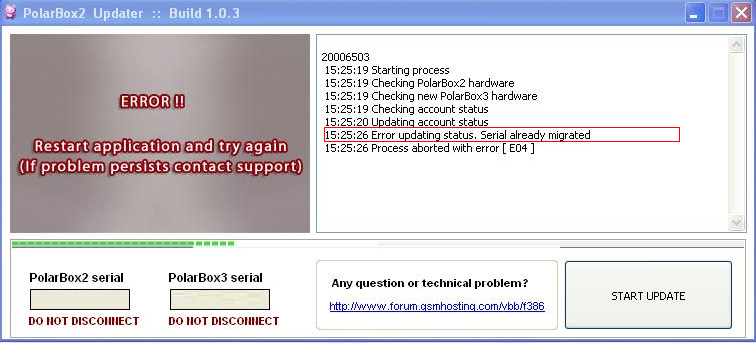 ANSWER serial already migrated mean no need to update now open box, remove old dongle and pic, install p3 inside box install last update, run sat, write ur login and pass and generate ur licence box ready for use enjoy 1- open box 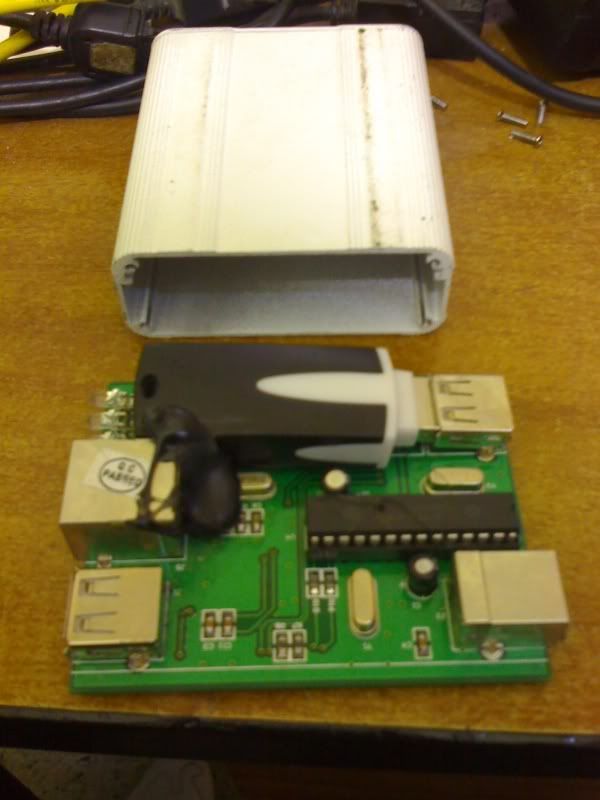 2- remove dongle and pic 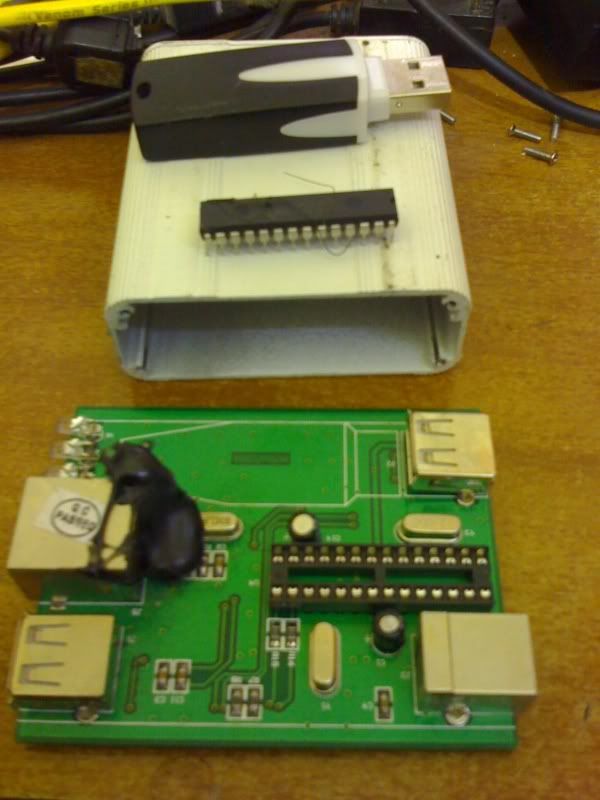 3- insert P3 dongle 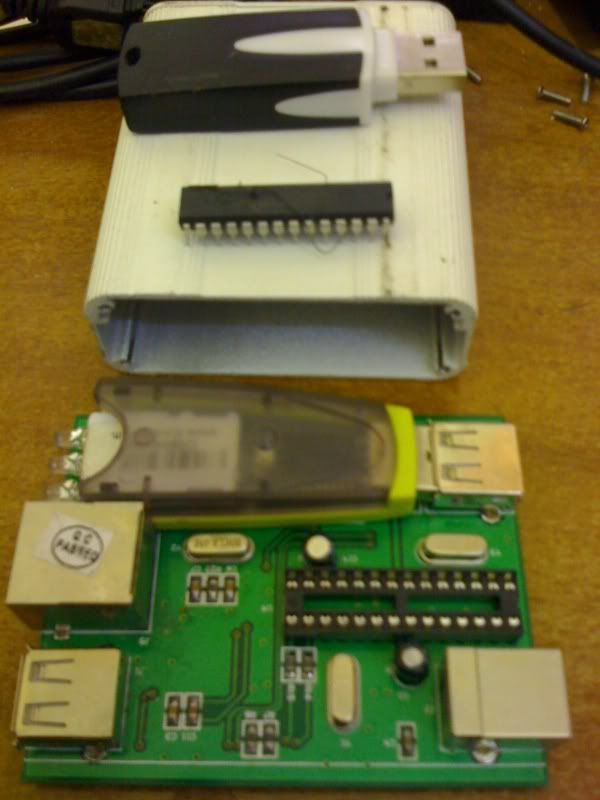 install last update, run sat, write ur login and pass and generate ur licence box ready for use Last edited by The_Gorr; 10-26-2011 at 16:48. |
|
| Bookmarks |
| Thread Tools | |
| Display Modes | |
| |
 Similar Threads
 | ||||
| Thread | Thread Starter | Forum | Replies | Last Post |
| HELP!!! BACKGROUND SCREEN LOGO | Michael Go | Nokia Legacy Phones ( DCT-1 ,2 ,3 ,L ) | 8 | 11-23-2017 08:11 |
| my 8810 is phone locked ,can somebody please help | duyphuc | Nokia Legacy Phones ( DCT-1 ,2 ,3 ,L ) | 18 | 12-23-2014 09:03 |
| Eeprom dump lost, help needed. | CAMILO | Nokia Legacy Phones ( DCT-1 ,2 ,3 ,L ) | 6 | 11-29-2010 19:04 |
| Help with 6110 | paulomt1 | Nokia Legacy Phones ( DCT-1 ,2 ,3 ,L ) | 2 | 05-25-2009 16:29 |
| Upload & Download Eprom | Lousangeles | Nokia Legacy Phones ( DCT-1 ,2 ,3 ,L ) | 2 | 06-24-1999 05:45 |
|
|




 Linear Mode


